Just a quick example of the new ability to specify the Hatch origin in AutoCAD 2006.
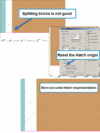
Lets say you have a brick Hatch pattern. You want to have the brick Hatch to be centered or start at a certain point to be accurate. You would not want the brick Hatch pattern to be splitting bricks.
Select the Hatch and then double-click to get the Hatch dialog. Now select the option to set a new Hatch origin. That’s all there is to it. You can also use other options such as center the hatch.
Discover more from Between the Lines Blog
Subscribe now to keep reading and get access to the full archive.
 Select the Hatch and then double-click to get the Hatch dialog. Now select the option to set a new Hatch origin. That’s all there is to it. You can also use other options such as center the hatch.