
 Shaan Hurley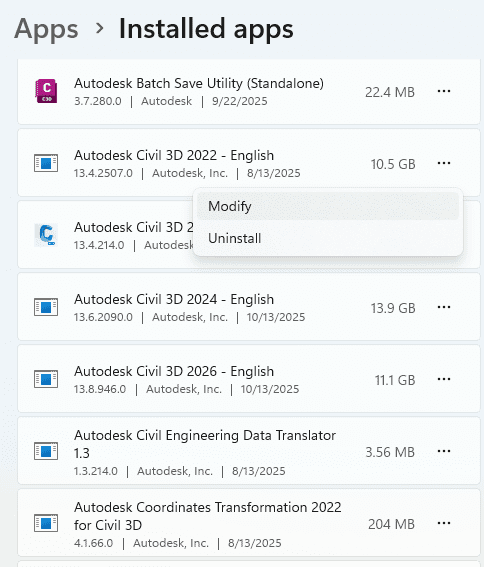
I want to hear how others are handling Autodesk product uninstall or upgrades in a multi user network environment, because in my experience the current uninstall process is still leaving too many remnants behind. The leftovers are not small. They cause real crashes in production, and we can trace many of them right back to old UPI keys and fragments from versions that should have been removed.
The pattern shows up the same way every time.
We uninstall.
We reboot.
We install the new version.
Everything looks fine.
Then the user crash reports start rolling in…..
When we dig into the CER (xml file) and debug logs, we find the same root cause. Old keys. Old folders. Old things. Things the uninstall should have cleared, but did not.
Right now IT has to chase these down by hand. They delete registry keys, clean folders, fix ODIS leftovers, clear licensing data, then hope the install holds. Even with our internal cleanup scripts and all the steps from the official Autodesk KB, the machine is never truly clean. And when the new version acts up, it lands on IT or the CAD manager to explain why a “clean uninstall” was not actually clean.
The only tool that reliably clears the machine is the Microsoft Troubleshooter tool but we cannot run that silently or at scale. That makes it a nonstarter for enterprise use. We use to have an Autodesk Uninstall cleanup trool, but that has been discontinued.
The Autodesk KB articles like this one explain what to delete, but that is the problem. We should not need to delete anything manually. We should not be guessing which leftover folder or registry key is causing trouble. We should not be building our own cleanup routines just to give users a stable install.
We need a real clean uninstall tool from Autodesk. One pass. No guessing. No registry spelunking. No surprise leftovers that trigger a crash a month later. Something that removes all versions, clears all UPI keys, all ODIS remnants, and resets the environment so the next install is on solid ground.
Most firms cannot keep losing time to uninstall, reboot, reinstall, crash, repeat. When the base installer leaves older components behind, it looks like user error even though the root cause lives in the leftover Autodesk data.
So I am asking my readers and the community
How are you handling this today?
Do you have a consistent and clean process for removing Autodesk products at scale?
What tools do you use for your network install deployments?
This Opensource GitHub – DonovanPhoenix/AutoDeskRemovalTool looks interesting, but unfortunately it is all Autodesk product removal and cleaning instead of selective.
If there is a better way to do this, I want to hear it. If not, we need Autodesk to prioritize a real solution. The current approach is not sustainable for IT teams or end users.
Thanks in advance for sharing anything that has worked for you in the comments.


This is very much an issue. Some normal IT activities do reset the stage. For instance, production engineers typically get a new machine every 3-5 years. Also, when you start at a new company, you tend to get a new machine. And, in the case of the OS, IT often prefers to wipe the drive and start new instead of upgrading the OS in place; presumably for similar reasons you discussed about applications.
That said, I can see a future where version installs become ‘agnostic’ in nature and are simply updated in-place much like cloud apps; gmail for example. Would that future be bulletproof? Of course not. But most leftover junk would be eliminated. For that matter, how soon till all desktop apps move to the cloud since the data is already there? Then we can use a dumb terminal. Yes, IT is moving back to the mainframe, its just in the cloud now. 🙂
Kevin, I agree. New hardware and clean OS rebuilds do clear the slate, but most users live on machines that go through several Autodesk upgrade cycles before IT ever wipes them. That’s where the leftovers stack up and the trouble starts.
A cleaner, in-place update model would fix a lot of this. Cloud apps avoid these problems because the client stays thin and the update path is controlled. Desktop CAD isn’t there yet, and heavy local installs still carry years of technical debt.
I’m not sure full “dumb terminal CAD” fits every workflow, but we do need an install and uninstall process that doesn’t break down over time. We shouldn’t have to rebuild a machine just to get a stable Autodesk install.
Thanks for the comment!