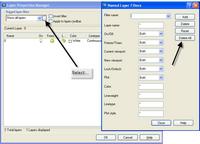
Prior to AutoCAD 2004, if you pasted a block or inserted into a drawing the layer filters from the block would also come along. In some cases the drawings would get quite a few layer filters. Customers pointed out this problem and we changed the behavior in AutoCAD 2004. No longer do layer filters come in with blocks whether pasted or inserted. Also you can easily now select or delete all filters in the drawing. No more need for a custom LISP to do this.
We Listen
Cheers,
-Shaan
2 comments
Nice, but if your drawing is loaded down with them, you end up holding down the dele key for about 3-4 minutes… this means drafting or design time wasted. There should be a select all to remove them and a way to create filters that can be a standard that would be brought into a drawing.
Reply from Shaan:
Dave,
In AutoCAD 2005 you can select all of the filters at once and delte them in the Layer dialog.
Cheers,
-Shaan
Loading...
On drawings loaded down with named layer filters, the “Delete All” button will lock up AutoCAD LT 2004 for a VERY long time. I have client drawings here that take nearly an hour of watching the hourglass spin before the routine completes. The drawings shrink from 5Mb to 500Kb. LOTS of named filters, but it seems like deleting the data shouldn’t take that long!


Nice, but if your drawing is loaded down with them, you end up holding down the dele key for about 3-4 minutes… this means drafting or design time wasted. There should be a select all to remove them and a way to create filters that can be a standard that would be brought into a drawing.
Reply from Shaan:
Dave,
In AutoCAD 2005 you can select all of the filters at once and delte them in the Layer dialog.
Cheers,
-Shaan
On drawings loaded down with named layer filters, the “Delete All” button will lock up AutoCAD LT 2004 for a VERY long time. I have client drawings here that take nearly an hour of watching the hourglass spin before the routine completes. The drawings shrink from 5Mb to 500Kb. LOTS of named filters, but it seems like deleting the data shouldn’t take that long!