I have ran into this question myself and thought I might share the tip that was given to me from AutoCAD developer Kurt Chase. When you have Mtext you can use the Enter key to break the paragraph or add a space. But when the Mtext is in a AutoCAD 2005 Table Enter moves you to the next cell. What you do is just like in Microsoft Excel and use ALT+Enter.
Link to my blog post on using the AutoCAD Tables and Mtext to achieve multiple columns of text. Link Here
Cheers, Shaan
Discover more from Between the Lines Blog
Subscribe now to keep reading and get access to the full archive.
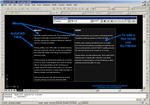
 I have ran into this question myself and thought I might share the tip that was given to me from AutoCAD developer Kurt Chase. When you have Mtext you can use the Enter key to break the paragraph or add a space. But when the Mtext is in a AutoCAD 2005 Table Enter moves you to the next cell. What you do is just like in Microsoft Excel and use ALT+Enter.