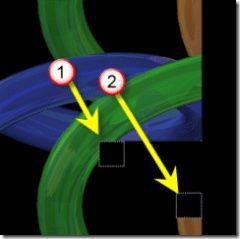
Did you know the new mental ray renderer in AutoCAD 2007 will make use of multi-core CPUs or multi processors if present? If you have a multi-core or multi processor system you will notice that during rendering there are two render tiles which indicates each core or CPU is processing a different region of the image.
Animated GIF showing the the two separate render tiles being processed.
You can also change the order in which tiles are processed to even process in a spiral pattern using the Advanced Render Settings Palette.
From the menu View>Render>Advanced Render Settings
Command: _rpref
Cheers, Shaan
2 comments
I just bought a new computer for at home. Its a Dell 690 Dual Core 2.0 hz, windows vista 32 bit with 8 gig of ram (expandable to 32. Just out of curiousity I did a render on a HP xw4400 dual core with 4 gig ram and it took 22 mins, on mine the same model and settings, it took 48 min!. Is there variables that i should check to ensure my machine is up to speed?
Loading...
Matthew,
There could many factors when comparing two machines. There could be significant result differences due to Operating System like comparing Windows XP to Windows Vista, hardware, drivers, background applications running on the system, the file or settings, and more.
Regards,
Shaan


I just bought a new computer for at home. Its a Dell 690 Dual Core 2.0 hz, windows vista 32 bit with 8 gig of ram (expandable to 32. Just out of curiousity I did a render on a HP xw4400 dual core with 4 gig ram and it took 22 mins, on mine the same model and settings, it took 48 min!. Is there variables that i should check to ensure my machine is up to speed?
Matthew,
There could many factors when comparing two machines. There could be significant result differences due to Operating System like comparing Windows XP to Windows Vista, hardware, drivers, background applications running on the system, the file or settings, and more.
Regards,
Shaan