http://www.autodesk.com/migrationtools
Link to Standalone ScriptPro for AutoCAD 2007 and AutoCAD 2008 (2.8MB)
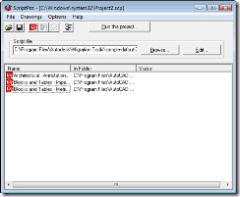
 The new version was just posted to the web for download today. ScriptPro takes AutoCAD scripting to a new level with an easy-to-use interface, logging, reusable project files, enhanced scripting with new keywords and utilities, and robust error recovery. Using ScriptPro, you can apply a set of commands to multiple drawings by simply specifying a script file and the list of drawings that you would like to apply the script to.
Supported Operating Systems
Before you install ScriptPro, make sure that you’ve got a supported operating system.
Operating Systems
Supported Products
Product Versions
AutoCAD 2007 or later
Autodesk® Architectural Desktop 2007 or later
Autodesk Map® 2007 and later
Autodesk® Land Desktop 2007 and later
Autodesk® Mechanical Desktop® 2007 and later
AutoCAD® Mechanical 2007 and later
Note: This product is not intended to operate with any version of AutoCAD LT®.

Any idea when there will be one available for 64-Bit?
Thank you for the question. I am not aware of any current plans to migrate ScriptPro to 64-bit. The 64-bit operating system has some limitations for supporting VB applications like ScriptPro. Most likely the ScriptPro would have to be rewritten from scratch.
Regards,
Shaan
We have been using SciptPro for years. We have recently discovered that when we run the new ScriptPro with AutoCAD MEP that you get a Fatal Error each time AutoCAD closes. Is ScriptPro no longer supported with MEP or is this just a “feature” that we are experiencing?
Thanks…
Gene,
I am unaware of the fatal error you are mentionming with ScriptPro and MEP but it is also not listed as one of the tested and supported products. I also dont use MEP but if you select the “Contact Us” link on any autodesk.com main pages there will be a product feedback form and when you select the product the form will be sent directly to the product team (actual humans) and perhaps they are aware of a MEP conflict. Please let me know if you run into any roadblocks or do not get it resolved as I can then see what I can do.
Regards,
Shaan
I use the scriptpro for all my projects I am glad to see it is still around……..
As posted by Shaan above, I too get the Fatal Error each time AutoCAD closes. I am using AutoCAD 2008 and have tried on several machines. Is this a known issue? Is there a fix?
Thanks…
AutoCAD 2008 CRASHES out of each dwg when ScriptPro 5.1.2600 invokes it’s quit command. The end of the log looks like this:
~~~~~~~~~~~~~~~~~~~~~~~
Command: qsave
Command: scr-quit
_.quit
Command:
~~~~~~~~~~~~~~~~~~~~~~~~
(That’s my qsave command)
Any fix / workaround yet? Thanks!!
Is it really necassary to close Autocad after each drawing? Anyway to turn it off?
i 2nd the “close autocad after every drawing” thing. makes more sense to leave it open till all drawings are processed.
I’ve just tried Scriptpro and had the same problem with a crash if the last line was _.quit.
However, it doesn’t really need the command as Scriptpro is going to close Autocad down after each session anyway. I tried taking it out and it solved the problem.
But likewise would prefer one continuous session to work thru all the drawings.
Ian,
You should run the AUDIT command on your drawings. ScriptPro cannot get passed a corrupt drawing all the time depending on the type of drawing corruption encountered.
Sincerely,
Shaan