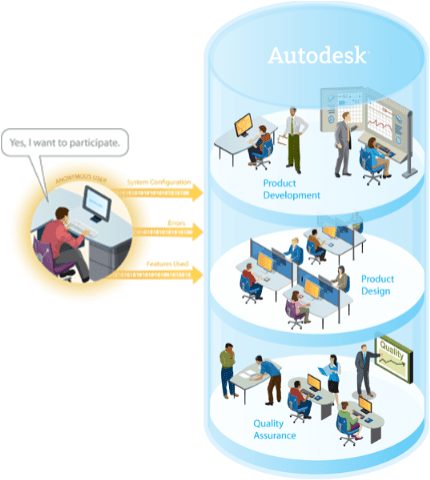
 Now when you crash an Autodesk product not only is the important details are sent to Autodesk and later an email notification if you entered your email address when a fix is available, but now you can see/search immediately if there is a fix for this issue. Unlike many other software companies that simply rely on a default crash reporting mechanism that may just send out your feedback and the valuable details into a black hole or to Microsoft who cannot fix the problem and offers no help of any kind, Autodesk knows how important it is to correct any issues we can with our products. This is a very important project and resulting in more stable and higher performing Autodesk products which results in happier and more productive customers.
I have wrote many blog posts over the years on CER and CIP explaining the process and why you should participate as it helps you get resolutions to issues you have been encountering or with CIP your command usage of AutoCAD 2008 helps develop a greater understanding by Autodesk on how our products are used and how to improve.
-
We Try Hard!
-
Help Autodesk to Help You – March 2007
-
AutoCAD – Customer Error Reporting (CER)
-
Recent Customer Error Report “CER” Changes
-
Your Customer Error Reports Are Very Important
-
85% Do Not Enter an Email in Their Error Reports
-
Customer Error Reports – Please Send Them In
AutoCAD CER http://www.autodesk.com/cer
Autodesk Customer Involvement Program (CIP)
 Now with AutoCAD 2008 Customer Involvement Program (CIP) a customer can elect to send anonymous usage data we will get even better. We hope that customers will enable anonymous CIP data reporting to help us understand how they are using our products so that we can make even more solid decisions based on that data.
Please make sure if you do happen to crash (we hope you don’t) to be sure to send in the CER report each time it occurs so our teams can research the culprit. And no, there are no file names, bank accounts, DNA details, covert black helicopters circling when you send the data or people checking your serial numbers and knocking on your doors. In fact all the data is on your machine unencrypted before sending if you like to snoop and verify for yourselves.
Happy Holidays,
Shaan (suffering from a bad cold, and too much snow)

This sounds like a great improvement and I look forward to looking into the “see/search for fix” function.
As a CAD manager I would love to be able to get my hands on the error reports that are sent in using the CER system. I tell all our users to always send in the reports. I put my email address in for every system in our company and I have been reminded where I forgot to apply a service pack. But it would be very valuable to know just how many reports are actually being sent from our group. Maybe even what kind of errors etc.
Thank you for the feedback. As for seeing all your groups reports we continually discuss this and how to accomplish it perhaps by subscription customers and the subscription account admin but there are other hurdles as well. But we wont give up and perhaps a solution will appear in the future. CAD Managers also want the CIP data such as usage and such but that one is even more difficult due to privacy laws around the world.
Regards,
Shaan
Walter,
It sounds like a corrupt file or possibly a DLL conflict. Try using the RECOVER command on the file.
Also have a look at the knowledge Base document: http://usa.autodesk.com/adsk/servlet/ps/item?siteID=123112&id=9450349&linkID=9240617
Shaan
PING:
TITLE: AutoCAD 2009 and AutoCAD LT 2009 Update 2
BLOG NAME: Between the Lines
In an effort to continuously improve Autodesk products AutoCAD 2009 and AutoCAD LT 2009, we have are now releasing the AutoCAD 2009 Update 2 after customer beta testing at Autodesk MyFeedback (http:\myfeedback.autodesk.com).
PING:
TITLE: Autodesk Research on Command Usage from CIP Data
BLOG NAME: Between the Lines
The Autodesk Research group has been slicing and dicing data to better understand the top commands and then the top 3 following commands after that command and even links to the predicted next command based on the data.
PING:
TITLE: AutoCAD 2009 and AutoCAD LT 2009 Update 1 (Service Pack)
BLOG NAME: Between the Lines
AutoCAD 2009 and AutoCAD LT 2009 Update 1 has been released to customers to improve the product experience.
I get a error when I open a drawing.
Unhanding Exception E06D7363 (e06d7363h) at address
7C812AFBH. How can I fix this.