Randy Kintzley of AutoCAD Bonus Tool and Express Tool fame and in recent years a developer in core AutoCAD has released a nugget to Autodesk Labs.
Navigation Bonus Tool for AutoCAD
 This Navigation Bonus Tool provides backward and forward display navigation within AutoCAD 2008 and 2009. This is similar to the forward and backward option in your web browser. This is not UNDO and REDO. It is tracking everything that is being done so it can roll back or forward. I am testing the Bonus Tool myself but have not seen an impact to performance, but if you see a problem please make sure to email us the feedback at the email: labs.acad.navbonus@autodesk.com
The following items are tracked and added to the history while you work:
- Active drawing switch
- Layout switch
- View changes such as zoom, pan …etc
- Active viewport switch
- Viewport maximize/minimize
Ways of accessing this functionality:
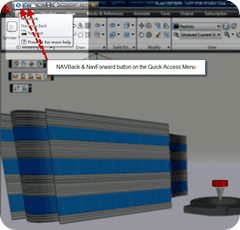
- Toolbar: Note back/forward arrows in the upper left corner of the AutoCAD window
- Mouse: If your mouse has buttons that allow forward and backward navigation in your web browser, they can be used for this purpose in AutoCAD as well.
- Keyboard shortcut: [ALT]+[LEFTARROW] and [ALT]+[RIGHTARROW]
- Commands: NAVBACK and NAVFORWARD
It takes a little getting used to but can be very handy.
Navigation Tool Link: http://labs.autodesk.com/utilities/acad_navigation_bonus/
Autodesk Labs Link: http://labs.autodesk.com/
Give it a try and let us know your feedback labs.acad.navbonus@autodesk.com
Thank you Randy & Autodesk Labs!
Now please give us more more more AutoCAD Bonus Tools!
Cheers,
Shaan

Shaan, I have downloaded the Navigation Bonus Tool for AutoCAD, but what do you do with it after you download it? What directory do I put it in Autodesk Architecture? Thanks and look forward to hearing where it goes.
Tim,
All the details and feedback are listed on the http://labs.autodesk.com. Labs is a place where we place some technology to get the feedback of those who try it to see where to take that technology in the future.
Feedback is critical to the improvement or success of Labs utilities.
“Give it a try and let us know your feedback labs.acad.navbonus@autodesk.com”
Best Regards,
Shaan