For those brave souls that like to test pre-release beta versions of an Operating System the opportunity to test the next Windows release Windows 7 is available to the public from Microsoft’s TechNet site. Be aware with tens of thousands downloading at once the speed could be very slow. also be aware there are risks to beta testing and more so with an Operating System than an application. I would strongly suggest not upgrading your current system and instead use a dual boot to another drive or partition as a safety measure.
The Windows 7 Beta Download aka Windows 7 Beta Customer Preview Program
- Windows 7 Beta Videos
- Windows 7 Beta: Frequently Asked Questions
- How to Dual Boot Windows 7 with XP or Vista
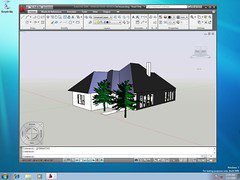
Update 01/11/09: I know many are curious how AutoCAD or if AutoCAD installs and runs on the next OS from Microsoft. The simple unofficial answer is it does in my limited testing.

There is no official support or completed testing from Autodesk yet but in my limited testing AutoCAD 2009 appears to work very well on the next Windows OS, Microsoft Windows 7 Beta version.
 Once the Operating System completes beta stages Autodesk will address the support of the new Operating System. While we are working closely with Microsoft as one of our partners and also looking at and testing Windows 7. It is important to keep in mind it is a pre-release beta and a moving target.
Cheers,
Shaan

Looks like Microsoft pulled the download 🙂
Could it be this generated too many hits?
Yes they apparently got overly swamped by requests for downloads of the Windows 7 beta. Although the download direct links are still working the download pages are redirected. I would imagine they will roll it live again really soon.
Cheers,
Shaan
I dl’d the 64-bit version (3.15 gigs) in about 1.5 hours Saturday. I’m gonna have some fun.
So what do you call it when you run beta software on a beta OS? Double jeopardy? Or just leading with your chin?
I have successfully downloaded both 32 and 64-bit versions (installed just 32 so far).
Looks pretty much like a Windows Vista with all bugs fixed, some enhancements and with a huge performance improvement!
Don’t you think that would be better to name it as Windows Vista R2? 🙂
Fernando.
Inventor 2009 and Windows 7 🙂
http://blog.inventor-faq.de/2009/01/13/inventor-2009-unter-windows-7-beta-build-7000/
how to install autocad 2009 in Windows 7
Hernan,
In my personal testing AutoCAD 2009 and 2010 just installed normally on Windows 7 without modification. Just make sure you install the 32bit AutoCAD on the 32 bit version of Windows 7 and 64bit on the 64bit Windows 7.
Best Regards,
Shaan
I’m running autocad 2009 64bit on Win7 64 bit.
Runs smoothly enough. Although i did run into some imcompatibility issues. Tried all previous windows compatibility modes to no avail. It locks up the program just after you close the welcome window whats new window.
tracked the problem down I think
Freezing issues only occur if i launch the program from the new taskbar. (I love the taskbar)
Sadly now i use the desktop shortcut and this seems to rectify the problem.
I noticed this with several other programs as well that when launched from the taskbar issues can occur.
Hi, I’m currently trying to run AutoCAD MEP 2009 on Win7 64-bit. The trouble I’m running into is that every time I try the ‘open’ or ‘save as’ command the program freezes. It also seems to happen if i try to select an object without starting a command first. Anyone have similar issues? any ideas? I’ve tried repairing and finally a re-install niether seemed to fix this.
I am running Autocad LT2009 on Windows 7 (version 7100). Install is fine.
It is very sluggish every time i draw start to draw a line – whether in a brand new file or large file. I have tried all of the different compatibility settings but nothing.
In order to access the “compatibility settings” for Autocad, you have to actually go to the .exe file and right click. it does not work through the desktop icon or under the programs tab.
Has anyone else had this issue?
Kevin,
AutoCAD 2008 should work in compatibility mode but there may be some issues and it is not officially supported. I am even running AutoCAD R12 Windows, R14, and even AutoCAD 2.18 in my Windows 7 machine.
Shaan
PING:
TITLE: Autodesk Announces Support for Windows 7
BLOG NAME: Between the Lines
The Autodesk official supported products for the new Microsoft Windows 7 Operating System announced today. Also a new Project Cooper released.
PING:
TITLE: AutoCAD 2010 on Microsoft Windows 7
BLOG NAME: Between the Lines
With the impending public release and launch of Microsoft’s latest Operating System Microsoft Windows 7 I have been receiving many emails about it and AutoCAD 2010 support.
Do you know if AutoCad 2008 will work with the windows 7?