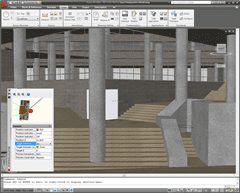
In AutoCAD 2007 we added the ability to navigate in a 3D AutoCAD model almost like you can in a video game using the keyboard or mouse to walk or fly.
Walk is a method to navigate in the X-Y plane while Fly allows you unrestricted movement X-Y& Z directions.
The commands are accessible in three locations or four if you use toolbars.
The Ribbon > Tool > Animations,
The SteeringWheel 
Or by the command line 3DWALK or 3DFLY and WALKFLYSETTINGS
Walk and Fly Navigation modes for the keyboard and mouse.

- Up arrow or W key = Move forward
- Down arrow or S key = Move backward
- Left arrow or A key = Move left
- Right arrow or D key = Move right
- Drag mouse = look around and turn
 F key = Toggle fly mode

- Tab key = Show the navigation key mappings
Open a 3D Model and then use the command 3DWALK. In the Position Indicator palette set the Z elevation to what you want the eye level to be as you walk in the X-Y. You can also navigate using the Position Locator palette. Hit the F key to toggle the Fly mode. You can even record the walking and flying around.

Give these a try as they are not only fun but handy to look around or record animations and fly-by or fly-through sequences. There are many settings to control speed, elevation, target, visual style, and more. I will post a recorded animation from inside AutoCAD using 3D Walk and Fly later. I just scratched the surface with more left for later.
I also use the SHIFT+Mouse middle wheel to navigate around in 3D for a quick orbit.
Shaan

Hello,
Can you help to which software version should I purchase. I am printer. I have clients in my city who brings AUTOCAD 2008/2007/2006/2005 DWG files for printing. They are sometimes black and white and some are in Color.
I need a software which opens these files and able to print it with preview. How I used in Autocad 2007 trial package. I dont know how to draw the drawings. Only require for printing. I Tried other software like AXCAD which are cheaper. But getting very good results in AutoCad 2007. I Print Civil, Mechanical and interior drawings. Help me.
My budget not more than US$ 300.
Thanks
Varun Gandhi
Shain,
You can use one of two free Autodesk software packages to accomplish what you want.
If you want to plot DWG files you can use the free DWG True View which is 100% AutoCAD and DWG compatible http://www.autodesk.com/dwgtrueview.
If your clients were to use the DWF format you can use the Autodesk Design Review http://www.autodesk.com/designreview.
Best Regards,
Shaan
How can i disable walk and fly because when i am editing my drawing it’s difficult to rotate when it is in walk and fly mode. maybe somebody use my computer and used my autocad and accidentally activated walk and fly. Thanks!
Shaan,
You mentioned that you can record walking & flying around in a model. I have no problem navigating around but can’t seem to find out how to record the movements ?? Help !!!
Walks,
There is the option to save ShowMotion or record a motionpath.
Cheers,
Shaan
there is one option – Motion Path Animations in view toolbar
select this option , after mention these – camera point / path , target point / path , no of frames – select the rile format – ok
Best Regards,
Nawaf Mohd
Shaan
When I record a 3DFLY or 3DWALK my background doesn’t come out. All I get is an animation of my model with a black background.
Please help if you have any ideas for me.
Ronnie