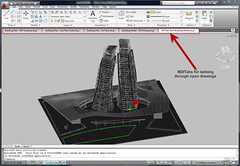
We have recompiled the much beloved Drawing Tabs MDITabs.ARX application for both 32bit and 64bit versions of AutoCAD 2010. MDITabs allows you to see and quickly navigate open drawings in a series of tabs along the top of the drawing window.
To install you simply place the appropriate ARX for your version of AutoCAD 2010 such as 32-bit or 64-bit in your support path. Now use the AutoCAD command APPLOAD to load it, and then add it to your start up suite so it loads each time you start AutoCAD 2010.
Please note this tool is unsupported and provided as-is.
Cheers, Shaan
18 comments
All Right!!! somebody listened and now I won’t get all kinds of carp from my in-DUH-viduals!!!
Loading...
THANK YOU!
Loading...
Please note that images stored on Flickr are blocked by our corporate filters.
Loading...
JGA,
That is really too bad your IT blocks Flickr as it is not insidious or dangerous, just pictures.
Next they will block Google, Yahoo, and disney.com. 😉
Shaan
Loading...
Is there any way to get the source code for these tabs? I was going down the road to make my own with a CAcUiDockControlBar , but I like how these behave better. I know enough ObjectARX to maybe eventaully make my own, but time is always limited it seems and better spent elsewhere.
Loading...
Matt, I agree with you, the source code would be nice, I seem to remember ADESK providing it for a brief moment and I downloaded the source some time back, but it was no where as complete as this one.
Thanks again Shaan.
KICKED- http://www.cadkicks.com/adkautocad/AutoCAD_2010_Free_Bonus_Tool_Drawing_Tabs
Loading...
I have seen this version, which works great in 2010, and I have seen the one for 2007 versions.
Is there a version that will work with 2008/9 on Vista and Vista 64-bit?
Loading...
There is no 64-bit version for the previous AutoCAD 2007/2008/2009 version of this tool.
Sincerely,
Shaan
Loading...
This application program is very found useful.
Thank you for the latest version. 🙂
Loading...
Dear Shaan,
i’ll ask about (AutoCAD 2010 free bonus tool drawing tabs).. i already install the MDITabs.ARX application 32bit and it’s work good BUT there is asmall star appear after the name of drawings (Ground.dwg*).
These star indicate to what?
Thanks,
Loading...
Imad,
Thanks for posting your question. The asterisk indicates a change has been made to the drawings database dbmod. This can occur in some cases when a drawing has to be converted to a newer format or has objects updated on open.
Thank you for Reading Between the Lines.
Best Regards,
Shaan
Loading...
Yes, of course it is free in the AutoCAD 2013 App store.
PING:
TITLE: AutoCAD Free Bonus Tool Drawing Tabs MDITabs
BLOG NAME: Between the Lines
am re-releasing the Drawing Tabs Bonus Tool. We have fixed some bugs identified in CER reports and recompiled the much beloved free Drawing Tabs MDITabs.ARX application for both 32bit and 64bit versions of AutoCAD 2010, AutoCAD 2009, and AutoCAD 2007/2…
Loading...
GOOD ONE 🙂
Loading...
A must have, but the tab order is wrong:
opening A.dwg, then B.dwg, then C.dwg displays tabs C B A from left to right
Loading...
Speaking of the little asterisk, it would be nice if the Styles toolbar showed an asterisk next to the Dimension Style if it has Overrides applied. That way I can quickly see if I need to make adjustments before I begin dimensioning.
Loading...
Great tool, thanks a bunch.
An options to save and then close would be nice (at least from my viewpoint)
Again, much appreciated.
Mike
Loading...
where do I find the “tools” command in AutoCad 2010
Loading...
thank you for such a great tool. do you have plans for a 2013 version?


All Right!!! somebody listened and now I won’t get all kinds of carp from my in-DUH-viduals!!!
THANK YOU!
Please note that images stored on Flickr are blocked by our corporate filters.
JGA,
That is really too bad your IT blocks Flickr as it is not insidious or dangerous, just pictures.
Next they will block Google, Yahoo, and disney.com. 😉
Shaan
Is there any way to get the source code for these tabs? I was going down the road to make my own with a CAcUiDockControlBar , but I like how these behave better. I know enough ObjectARX to maybe eventaully make my own, but time is always limited it seems and better spent elsewhere.
Matt, I agree with you, the source code would be nice, I seem to remember ADESK providing it for a brief moment and I downloaded the source some time back, but it was no where as complete as this one.
Thanks again Shaan.
KICKED-
http://www.cadkicks.com/adkautocad/AutoCAD_2010_Free_Bonus_Tool_Drawing_Tabs
I have seen this version, which works great in 2010, and I have seen the one for 2007 versions.
Is there a version that will work with 2008/9 on Vista and Vista 64-bit?
There is no 64-bit version for the previous AutoCAD 2007/2008/2009 version of this tool.
Sincerely,
Shaan
This application program is very found useful.
Thank you for the latest version. 🙂
Dear Shaan,
i’ll ask about (AutoCAD 2010 free bonus tool drawing tabs).. i already install the MDITabs.ARX application 32bit and it’s work good BUT there is asmall star appear after the name of drawings (Ground.dwg*).
These star indicate to what?
Thanks,
Imad,
Thanks for posting your question. The asterisk indicates a change has been made to the drawings database dbmod. This can occur in some cases when a drawing has to be converted to a newer format or has objects updated on open.
Thank you for Reading Between the Lines.
Best Regards,
Shaan
Yes, of course it is free in the AutoCAD 2013 App store.
PING:
TITLE: AutoCAD Free Bonus Tool Drawing Tabs MDITabs
BLOG NAME: Between the Lines
am re-releasing the Drawing Tabs Bonus Tool. We have fixed some bugs identified in CER reports and recompiled the much beloved free Drawing Tabs MDITabs.ARX application for both 32bit and 64bit versions of AutoCAD 2010, AutoCAD 2009, and AutoCAD 2007/2…
GOOD ONE 🙂
A must have, but the tab order is wrong:
opening A.dwg, then B.dwg, then C.dwg displays tabs C B A from left to right
Speaking of the little asterisk, it would be nice if the Styles toolbar showed an asterisk next to the Dimension Style if it has Overrides applied. That way I can quickly see if I need to make adjustments before I begin dimensioning.
Great tool, thanks a bunch.
An options to save and then close would be nice (at least from my viewpoint)
Again, much appreciated.
Mike
where do I find the “tools” command in AutoCad 2010
thank you for such a great tool. do you have plans for a 2013 version?