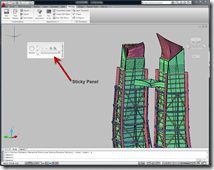
In AutoCAD 2010 products there is now a new ribbon option we call sticky panels. You can now tear off a ribbon panel to the drawing area. It will remain on your drawing area modeless much like a toolbar would.
In this quick bite size example I want to take the Action Recorder off the ribbon to my drawing area for easier access as I want to record and test some macros.
I simply select the panel on the lower panel description name and then hold the left mouse button and drag it off the ribbon. You could do this for other panels you frequently use perhaps the new Mesh panel or the Modify panel.


There is are option available on the sticky panel such as the ability to change the orientation of the panel from vertical to horizontal. I can also drag the sticky panel back onto the ribbon in a location I would prefer or select the option to return it to the ribbon which places it back where it came from.

Cheers,
Shaan

Hey Shaan, do you know of any site with pre-recorded actions that they are hosting?
Steven,
Great to hear from you. I am unaware of anyone sharing recorded actions at this time.
Shaan
I simply select the panel on the lower panel description name and then hold the left mouse button and drag it off the ribbon.
I could not get this to work
We have vanilla autocad trying to setup for the rest of the office with 2010. We have a subscription with about 30 seats.
I simply select the panel on the lower panel description name and then hold the left mouse button and drag it off the ribbon
I got this to work but I do not understand why it works now. All I did was shutdown autocad and restart