Here is a great tip from my Autodesk colleague Shiho Tanaka an AutoCAD QA Engineer here in the Autodesk San Francisco office. This tip covers the new AutoCAD 2011 Transparency property which has been a top request of AutoCAD customers.
In AutoCAD 2011, we added a new object property called “Transparency.” This is just like other object properties, such as Color/ Linetype/ Lineweight etc, and has ByLayer/ ByBlock/ Transparency value (0-90%) settings available. The purpose of Transparency is to make objects transparent so that you can see through objects underneath when they’re overlapping each other.


- How to apply Transparency object property:
There are several ways to apply Transparency to an object.
1. Ribbon: We added Transparency control and slider in Properties panel in Ribbon Home tab.

2. System variable: CETRANSPARENCY. This controls the default Transparency value when creating a new object.
3. Commands: We added Transparency option in CHPROP, CHANGE, -LAYER, VPLAYER, SETBYLAYER and LIST commands.
4. Properties palette and Quick Properties: We added Transparency property in both Properties and Quick Properties.
5. Layer Property Manager: We added Transparency column in Layer Property Manager.

- How to plot Transparency:
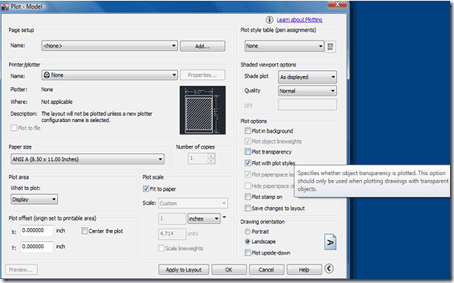
The primary option for controlling plot transparency is in the “Plot transparency” checkbox in the Pagesetup/Plot dialogs. It was added as an option because there is a performance hit when plotting with transparency. This checkbox option allows you to specify that only certain plots in their Batch plot/Publish process be plotted with transparency.

If however, you would like a “global” switch to turn transparency On or Off for all plotted output, you can use the PLOTTRANSPARENCYOVERRIDE system variable to override the “Plot transparency” setting in the Pagesetup/Plot dialogs. The PLOTTRANSPARENCYOVERRIDE=0 or 2 option (OFF and ON for all drawings) should be used sparingly, as it does not update the “Plot transparency” checkbox in the Pagesetup/Plot dialogs, and could lead to confusion.
- Transparency for 3D users:
You will see back face lines in 3D objects when visual styles, such as Conceptual, Hidden, Shaded with Edges,,,etc are selected.
When you’re seeing these back face lines, please set VSSILHEDGES system variable to 0 to turn the lines off.
Also, for the best result in 3D drawings with Transparency, setting “Transparency quality option” to High in Manual performance Tuning dialog is recommended.

This is a fantastic option and I can’t wait to use it! I’m sure it will really improve on how we can express and communicate our designs.
What kind of compatibility issues with previous versions of Acad? We will have 2011, but our engineers will stay on 2009LT.
I would like to plot a drawing with transparancy ‘on’ AND get a vector output instead of a pixel output.
Any suggestions?
Thanks in advance.
PING:
TITLE: AutoCAD 2011の新機能「透過性」の紹介
BLOG NAME: Between the Lines
AutoCAD 2011 では「透過性」という新しいオブジェクト プロパティが追加されました。透過性プロパティの値には ByLayer、ByBlock、あるいは固有の値(0-90%)を設定することが可能で、色、線種、線の太さなどの他のオブジェクト プロパティと同様の操作方法で設定を行えます。透過性の用途として、オブジェクトが重なっている場合に、上にあるオブジェクトに透過性プロパティを与えることにより、下にあるオブジェクトが透けて見えるようになります。…
Hi Ray,
Your engineers on 2009 will not see any transparency, but when the file is reopened in 2011 it should display the transparency again. But in some cases if you edit the object in 2009 the transparency is lost.
Why you are did not add this property at the object model? For example layout.PlotType is exists but layout.PlotTransparency or layout.Transparency is absent…
Excuse me my english i’m from Russia 🙂
@NIKOLAY TYPE COMMAND “SYSVDLG” GO TO TRANSPARENCY DISPLAY CHANGE THE VALUE FROM 0 TO 1 THEN IT WILL WORKS IN MODEL TOO
You can not use the command of transparency and having problems redinmientos. I can not explain to this.