This is a guest post by Edwin Prakoso of http://www.cad-notes.com/.
AutoCAD has been used as drafting tools for decades. In the beginning, people used AutoCAD to replace manual drafting table. Many people are still using it that way, at least in my country. I am not sure how people are using AutoCAD in your region today, but I believe many people are still using it that way. Many AutoCAD users forget that Autodesk has added many new features that can increase their productivity.
In this post, I would like to cover my favorite productivity feature: data extraction. This automatic process can generate your drawing information in a table. Let us see how we can implement it in our design process.
What is data extraction?
Snipped from help file:
“You use the Data Extraction wizard to choose the data source (drawings) to extract property data from selected objects. You can output the data to a table or external file.”
Data extraction allows you to get almost any (if not all) drawing elements’ properties from your drawing. You can then report the properties in a table within your drawing or as external file.
This example is using data extraction to generate set out points for land surveyor. As you can see, it generates the gully ID and three set out coordinates.

I am not going to write a tutorial how to use data extraction. Let us see how we can use this feature to take our drawings to the next level. The drawings are not just about showing lines and annotations. It also generates information! A little drawing management can actually boost your productivity and take your drawings to the next level. It is not just about how the drawings would look like when we plot it.
Several Data Extraction practice samples
AutoCAD is used in many industries, so data extraction implementation can be different for each industry. Let us see several usage of data extraction that I can found.
Laser Cutting Data
Data extraction can generate the object coordinates, length, layer, colors, etc. These are basic information that data extraction can generate. I found someone asking how to get these data for laser cutting. I am not sure how to use the data, but at least he gets what he is looking for.
Benchmark and Set Out Points
We can generate points coordinate from AutoCAD objects such as circles and points. However, if we manage our objects as blocks, we can get more advantages. It is not only easier to filter the objects; a simple benchmark point block can generate the block insertion point and the benchmark points ID. The ID is managed by block attributes.
Unlike basic AutoCAD objects, we can also generate multiple points coordinate within one block. A sample for this purpose is to generate set out points from a gully. This is very useful for land surveyor.

Holes Table
Holes table is common data you would like to have in manufacturing industry. This is very similar with benchmark and set out points for land surveyor. Engineers would like to have the holes coordinates and holes sizes. You can do it easily by data extraction!
Schedule
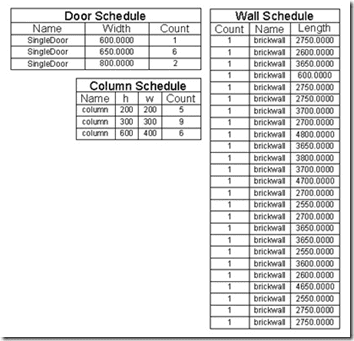
AutoCAD is not as smart as AutoCAD Architecture or Revit. Nevertheless, you still can make use the data in your drawings. For example creating column, door, or even wall schedules!
Again, the key is defining your objects properly. Dynamic blocks can be very useful. Dynamic block parameters can be reported by data extraction too. Therefore, you can report number of doors by their width, for example. You can also add more information such as door manufacturer, fire ratings, etc. Just like in AutoCAD Architecture or Revit! But sure, we are working in 2D here.

What is Your Favorite Practice of Data Extraction?
So are you already using data extraction? Do you have any other samples how we can utilize this feature in other industries? Please share it here, we would like to hear from you!
Edwin Prakoso
http://www.cad-notes.com/
If you would like to submit a guest post please Email Me for details.

Hi Shaan,
I would like to extract the data from the Sheet list in the sheet set manager to use in a word document or a excel sheet. I cannot find how this is possible because it seems to be locked. What do you think?
Thanks,
Ben
I would like to extract the data from the Sheet list in the sheet set manager to use in a word document or a excel sheet. I cannot find how this is possible because it seems to be locked. What do you think?
Thanks,
Mgambo
I’d like to do the opposite. I work with pressure vessels. Something like the working pressure of the vessel needs to appear in 3-4 places on the drawing (name plate, design conditions table, title block, etc.)
I have about 20 parameters that do this. (MAWP, MDMT, OP Pressure, High op temp, low op temp, units for all of these, serial number…. you get the point)
I’d like to see something like the drawing properties/custom properties manager with better usability so I can enter my design parameters in one table and call those parameters out in several places on the drawing through fields. The current custom properties manager is far too clumsy to do this in its current (ancient) evolution.
HELLO, I AM TRYING TO EXTRACT THE XYZ COORDS AS A DXF, HOW CAN I DO IT?
Dear Sir,
I am using autocad2013, and I am having problem with data extraction.
I start dataextraction on my door blocks, and I do that by selecting objects ( not by all objects in drawing).
Now if any of the selected ojects is deleted, I am receiving an error and my tables are deleted.
Please Help !
Thanks in advance.
Regards,
Dinkar.
I’m having some problems with the data extraction. I have a drawing in autocad with some coordinates, and when I see the objects properties, I actually see the X and Y coordinates I want, but when I ask de data extraction to find this points, I get some X and Y coordinates that dont match. Do you know why can this happen. The units of the drawing are in mm and when i create the block, i change the units to mm as well, but its default value is in inches, but I dont understand why does this happen.