I received the following question today while in my hotel room in LA and wanted to write a blog post with images to make the solution more clear, and perhaps assist others with the same question.
“My background in paper space is white with color lines, I want to change the color lines to black lines, I did once but is impossible to remember how I did it.”
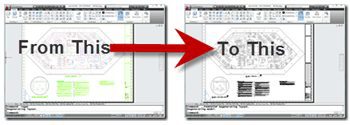
What we want to do is change the Layouts Plot Style to black and white which is “monochrome”, and then select the option to show the Layout with the applied plot Style just as it will plot.
![image[7]](https://i0.wp.com/realshaanhurley-vylag.wordpress.com/wp-content/uploads/2025/10/18ead-6a00d8341bfd0c53ef013486899b0d970c.png?resize=350%2C125 "image[7]")
A Layout is essentially what you plot as a large preview, think of it as a piece of paper. Here we see the drawing with a white Layout background just like paper and the color layer based lines. The only thing not shown is the plot style you may apply to the Layout. In this case we want the color line work that will use the monochrome Plot Style to show as Monochrome in the Layout.

Use the Page Setup Manager. I used the PAGESETUP command at the AutoCAD command line or you can right-click on the Layout tab and select Page Setup Manager.

Now select your layout then select Modify.

Now in the Page Setup dialog in the upper right change the plot style to monochrome and be sure to select the option to "display plot style" as that will make your layout display the monochrome.

Select OK and you are done.
Cheers,
Shaan

It is not essential to use the autodesk monochrome plot style, if your plot style has all colors or name plot styles set to an output color of black or grey scale. In this case you only need to set the “display plot styles” and apply the change to the layout.
There was a simple global monochrome display toggle back in ancient history, but my AutoCAD trivia brain fails me as far as pinpointing the exact release where that feature was removed. It may have been R14, but I’m not sure.
Yes, in R14 there was a monochrome setting in display preferences.
Thanks Jon,
Your right, I just used the method I use. So many ways to accomplish things that you can just get used to doing it one way. I still type DDMODIFY and DDIM. 😉
Cheers,
Shaan
Awesome! thx for sharing!!
how do you explain that in AC2011 even if the plot style is set to “monochrome” a pdf generated will display colors?
Make sure you have the PLOT dialog box has the PLOT WITH PLOT STYLES box checked.