With AutoCAD for Mac just launched for the Mac one thing people ask is what are the parts of the UI (User Interface) named. I created a quick graphic so everyone can refer to the proper terms.
AutoCAD for Mac UI Reference

1. Application menu bar
2. Drawing area
3. ViewCube tool
4. Palettes
5. Coordinate display
6. Status bar
7. Command line
8. UCS icon
9. Tool Sets palette
10. Viewport label menus
11. Spotlight search
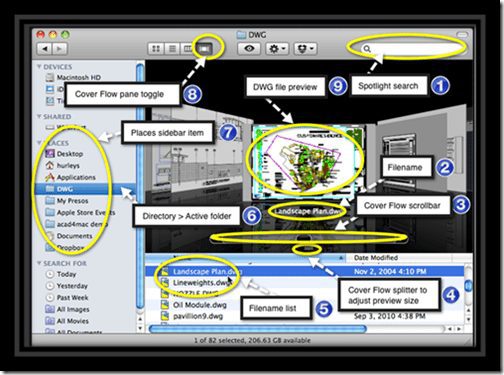
For the Finder Window

1. Spotlight search
2. Filename
3. Cover Flow scrollbar
4. cover flow splitter to adjust preview size
5. Filename list
6. Directory > Active folder
7. Places sidebar item
8. Cover Flow pane toggle
9. Drawing file preview
Cheers,
Shaan

I have a student asking if there’s a way to get to the “AutoCAD Classic” UI in the Mac version. I don’t think I see it above. Am I missing something?
To the previous commenter, I doubt that you will ever see AutoCAD Classic in the UI on the Mac, I don’t think that there should be either, it is not inline with the Mac setup. I also would not be surprised to see it, along with toolbars removed from AutoCAD for Windows in the near future, it just seems outdated now.
The deal breaker here is that Sheet Set Manager is missing, but all of our LISP routines seem to run on it just fine so far.
Where is the GIZMO Tools? =(