 As of today you can generate and manage isometric drawings using the Autodesk Cloud with the AutoCAD® Isometrics WS technology preview.
AutoCAD Isometrics WS technology preview on Autodesk Labs
Create, store, view, and share isometric drawings across desktop, web, and mobile devices.
Create, store, view, and share isometric drawings with AutoCAD® Isometrics WS. The AutoCAD® Isometrics WS cloud and mobile service enables you to design and collaborate across multiple platforms—desktop, web, and mobile devices. Create custom isometric configurations, upload PCF files from AutoCAD Plant 3D, Autodesk Inventor, or 3rd party applications, and then generate isometric drawings with full DWG™ reliability and compatibility.
I went through the process by generating a PCF file from a 3D orthographic pipe spool I created in AutoCAD Plant 3D, but you could use another program to export a PCF file. I then uploaded it and processed the file which then generated the 2D isometric drawings in a matter of seconds.
Here is the pipe spool with flanges and a valve that I created in AutoCAD Plant 3D 2012.

If you need a PCF file to test: Download 10001
This is the upload page for Autodesk AutoCAD Isometrics WS. You can change a few settings and then go.
AutoCAD® Isometrics WS
http://isometrics.labs.autodesk.com/

Here you can see prior isometric drawings I had created with previews. I can download or share the files.

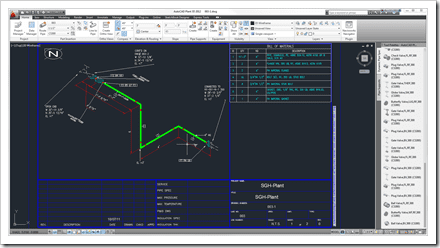
After downloading the generated isometric I opened the DWG in AutoCAD Plant 3D.

A Bill of Materials complete with cut list is created.

Here is another isometric drawing.

The cloud is not used solely as a storage location but for actual cloud computing saving your machine the energy and time as well as providing an easy way to share the data.
If you are in the piping design industry and generate isometrics check out this technology preview. All we ask is you provide feedback on the preview which is easy to do and all the info is located on the Autodesk Labs page for this project.
Cheers,
Shaan
(recovering former piping and vessel designer)
Go Process & Power Piping Designers!

If you have Plant 3D you can create 2D isometric DWGs, right? And if you want to collaborate on-line you could upload those to AutoCAD WS like any other 2D DWGs, correct? So where’s the need for AutoCAD Isometric WS? Does Plant 3D do the isometric creations really slowly and Cloud-based parallel processing does it much quicker?
This is a genuine question. I’m not having a go, I’m just not clear on the purpose of a specific isometric product here.
Steve,
AutoCAD Isometrics WS is not meant as a replacement to the integrated isometrics available with AutoCAD Plant 3D. Instead, it is aimed at making the isometric capabilities available for other Autodesk and potentially 3rd party applications who need isometrics. Also, this service will serve as a foundation/component for potential future services.
So are there other apps that create PCF files but don’t make isometrics?
Yes, there are applications that can create a PCF but not create an isometric drawing or perhaps someone shares or sends you a PCF.
It wider than just a case of someone with AutoCAD Plant 3D or an Autodesk product with a need to generate an isometric drawing.
Is there a way to generate a PCF or DWG isometric via the mobile application, either through a 3rd party software or Autodesk software
Chris,
Several Autodesk like Inventor and AutoCAD Plant (30 day full product trial is availabe for download) create the open standard PCF files as do several on-Autodesk piping design applications. I am not aware of any mobile piping design that would export a PCF as they are typically created by large piping design applications.
How about AutoCAD MEP? this is a perfect example of a program that cannot create Iso’s. but it also does not create PCF’s. 🙁 any suggestions here? I cant be the only Pieping designer looking to use MEP 2013 as a way for use of BIM.
How about a pcf file from a 3D model created in Inventor? And if so, will it create an Iso from fittings that were manually created as opposed to fittings pulled from Inventor’s components menu?
YOu can use a PCF exported by INventor but for exactly what types of supported components and custom ones I would suggest asking in the Autodesk Inventor discussion forum.
http://forums.autodesk.com/
Best Regards,
Shaan
I would suggest discussing this specific request in the MEP discussion forums as the team and support do read the posts and participate when they can.
http://forums.autodesk.com/
Bes Regards,
Shaan