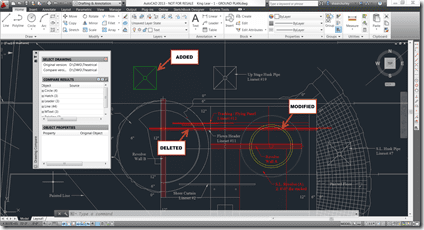
 Have you ever ended up with two drawings of the same name, just different time stamps on the file or an added suffix on the file name? Perhaps another team member was trying to be helpful (or not) and edited the file, now you need to know what changed.
Lucky for you there is an Autodesk App for that, and FREE.
I am using AutoCAD 2013 which is the version compatible with this app. Go to the Autodesk exchange from within AutoCAD using the icon in the upper right.

Or you could go to the Autodesk Exchange page http://apps.exchange.autodesk.com/

Search for DWG Compare App, and the install it. while there grab the Drawing Tabs App.

After setting the original source drawing and the second version you select the little green arrow in the top of the DWG Compare plugin palette.

Now the results will be listed on the palette and you can select them and it will highlight that specific change. You can see what has been added, modified, or deleted as they are colored green, yellow and red and to make it obvious the non-altered objects are changed to a grey.

Cheers,
Shaan

Shaan,
Do the files themselves need to be in AutoCAD 2013 format or can they be from a prior version? We save our files in AutoCAD dwg version 2010 for compatibility with our clients.
Thanks,
Jon McFarland
@curtainwallBIM
curtainwallBIM.blogspot.com
The DWG files do not have to be 2013 format as I have compared 2010 ver. to 2013 ver. of the drawing. The plugin itself is for AutoCAD 2013 only.
Does this app only look at changes in core AutoCAD objects or can it also look at AEC object changes created by ACA or C3D?
Thanks
It highlights most objects but I am not 100% confident on saying it is able to identify ALL objects such as ARX custom and proxy objects.
It was based on the Drawing Compare feature in AutoCAD Architecture.
Hello Shaan,
This is a really useful utility. I have a similar requirement for an application that I am developing on top of AutoCAD. You mentioned that you are using drawing compare architecture of AutoCAD. I wanted to use the same and write my own flavor of comparison app. But I could not find any interface to use this architecture. I have been coding with AutoCAD .net for quite some time though.
It will be really helpful, if you could tell me how it can be used.
Regards,
Mohan.
It is built on the same code base as the Compare feature in the product AutoCAD Architecture not. If you are interested in any possible API I would suggest going to the ADN, the ObjectARX SDK, or perhaps the customization discussion forums at http://discussion.autodesk.com
Best Regards,
Shaan
Hello Shaan,
Thanks for your suggestion.
I had already contacted ADN asking how to use comparison feature of AutoCAD architecture. But they said that the feature is there, but there is no API available to access it. Can you please tell me how you used that feature to develop this utility?
Best Regards,
Mohan.
Mohan,
It was developed by Autodesk.
Regards
Shaan
Where did it go? I downloaded this on another computer in the last month or so and now it has disappeared? What’s up with that?
Ewen
I am not sure where the app went, but will check on it.
Shaan
I just learned there is a bug with the current version. The team are working on resolving that and then updating it on the App Exchange.
Best Regards,
Shaan
This app is currently out of the App Store this week to fix a bug, then it will be placed back up for everyone. I have received so many emails on this popular app.
Cheers,
Shaan
Perhaps you could get them to fix the “bug” in the App Store so they can post a notice instead of just disappearing without a trace?
I will pass on the suggestion to see of a placeholder is possible in the future and how they could implement it in the exchange.
_Shaan
and how do you get this app??
once found and clicked a screen appears with more description and a “FREE” button which does not seem to work (reset internet connection).
totally unclear.
a short description of how to handle app’s would be welcome.