Autodesk ReMake is evolving to Autodesk ReCap Photo. Autodesk ReCap Photo will be part of ReCap Pro for both your LiDAR scan data and photogrammetry data. In addition to the great 3D mesh editing that was in the former ReMake, there are new features added like raising the limit of photos to 1000 photos and for creating 3D models and geolocated orthographic views from drone (UAS) imagery.
All for a very low monthly subscription and well below other comparable solutions.
Read More: http://autode.sk/2wZytrc
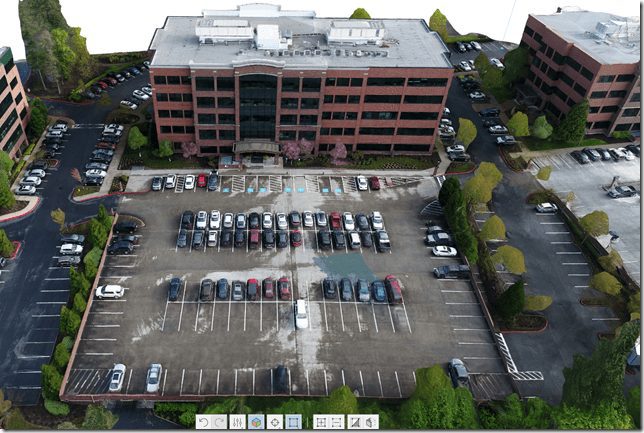
Here is a 3D building model I created from using the new ReCap Photo, known in pre-release beta as Project Condor. 

This building is the Autodesk Lake Oswego Oregon office. It was captured using a DJI Mavic Pro. The flight was less than 12 minutes and 45 photos that generated this model in less than an hour. I am a licensed FAA Part 107 Commercial UAS pilot and anyone performing any aerial work in the U.S. should be as well.
Do you want to get together and talk Autodesk, reality capture, drones, design, or at Autodesk University in about 60 days, let me know.
Cheers,
Shaan

So are ReMake and ReCap merging into one or is it going to remain two seperate software packages?
I know how busy you are, but I’d love to chat for 10 minutes. I have a Mavic Pro as well and I’m looking for new software / ways of using it, especially photogrammetry.
Jim,
Email me, happy to assist!
-Shaan
Hi Shaan,
Seems like the new Recap Photo Pro loose the ability to process the photos on your local computer (like Remake was able to do…)
Now every processing is done on the cloud and costing cloud credit (from 20 pictures upwards) on top of the subscription… Am I right ?
It will be one subscription but two products for now with what was ReMake and then ReCap.
Happy to chat on the phone or at AU.
Shaan
Due to the computational power required, support, and other factors it will be cloud only. My experience has been fast cloud processing but I also have remote projects where I don’t have web access and have to process things later. There is an API on Forge too.
How did you collect this data? Nadir images? Automatic grid? Is this the .obj from the processing workflow what we are seeing in these images? I use Pix4Dcapture, drone deploy and site scan, and I find very hard to believe what you are saying here. Let’s talk!
These pics are impressive!
How were the images captured? What software was used on the drone?