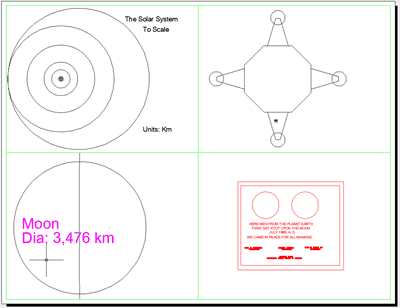
Back in AutoCAD version 2.18, Autodesk placed a sample drawing with AutoCAD named the Solar.DWG to demonstrate the precision of AutoCAD back in the early eighties. AutoCAD was based used 64bit floating point precision and the most accurate back then. With this Solar DWG you can see our solar system in 1:1 scale in kilometer units.
This would not be a good DWG to plot/print 1:1 full scale.
You can zoom all the way in on the Apollo Lunar Lander on the surface of the moon and read a plaque placed on it. You will notice the planets are from the eighties back before poor little Pluto removed as an official plane and now just another member of the Kuiper belt. A NASA team is working to get Pluto once again classified as a planet. Go Pluto, I’m rooting for you being a planet again.
Below are the steps to zooming in on the Lunar Lander and giving your fingers and mouse a workout. You could also take the easy route and use the saved views in the DWG.
When you open the DWG file in AutoCAD, you will see the Solar System. I have marked the area you should zoom to if you want to find the Lunar Lander which is on the Moon’s surface orbiting the Earth.

Once you zoom into the area shown in the prior image you will see both the Earth’s Moon and Earth. You will want to zoom in on the Moon.

Once you have the Moon located, zoom in further and you will see a crater and to the upper right the Lunar Lander we are searching for.

The plaque is located on the lower leg of the Lunar Lander.

And the text on the plaque on the leg of the lunar lander reads
I created a Sheet Layout with four views showing the main points of interest.

The DWG file for AutoCAD SOLAR from ACAD2-18-updated
Past articles on AutoCAD precision as well as a nice modern 3D Earth model in DWG format.
- More from the AutoCAD Accuracy Universe and the Floating Point Posted on 07 January 2004
If you took the long route to the Lunar Lander by zooming, give your fingers and mouse wheel a rest.
Cheers,
Shaan

Thanks for the drawing. I’ve read about it before but never seen it.
I can’t zoom enough to read the names on the plaque. I can read down to “MANKIND” but the rest won’t resolve.
Also, it looks like some drafter got confused between RADIUS and DIAMETER. The sun and pluto are drawn at twice the size of what the text label says they should be.
(And if we want to get really technical about it, all the orbits should be elliptical, not circular!)
BTW, where’s your info about pluto coming from? As far as I can tell it’s been a dwarf planet since 2006, and still is.
Thank you for the feedback Mark! First I read several articles that the team from NASA has convinced the IAU to once again classify Pluto as a planet but I have edited that paragraph to reflect it is not just yet.
As far as zooming down to the nameplate, limits might have changed in recent releases as I used to be able to regen and zoom in on the nameplate text.
Planetary orbits and misc funny stuff, well I cant alter the old historic drawing I could but then it would be the new Solar Drawing. I will have a look through it to make sure it was not altered from the original as I haven’t heard of the radius issues before.
Funny enough our founder is one of the biggest space and planetary fanatics out there and even wrote a orbit simulator. https://www.fourmilab.ch/solar/
It is also the reason we used to get a bunch of bug reports with AutoCAD render engine as the daylight wobbled and this caused some to question why and the support answer was because that is what the real Earth does round the sun.
Cheers,
Shaan
I just checked the Sun and Pluto as you mentioned they were incorrect, here is what I found:
Sun diameter text was 1,392,000 km and correct, but the actual circle was not that diameter.
Pluto diameter text was correct but the circle was incorrect as you pointed out. Being 2,784,000 km when it should have been 2377 km.
I am not sure if this was something introduced over time, a mistake, or an easter egg.
The drawing was not by a “drafter”.
Pretty amazing when you think of the AutoCAD 2.x used to draw it. It was to prove a point that you should always draw and design at 1:1 in CADS instead of factors.
Hi Shaan
“_audit” in the drawing brings up 17 errors (which can be fixed) like
AcDbViewTableRecord: “JUPITER”
View Width <= 0.0 1.0
Pierre
Not surprised as most 35 year old early DWG format drawings will have some quirks.
Oops – I misread “SOLAR from ACAD2-18-updated” to “SOLAR from ACAD2018-updated” …
At least it is metric! 🙂
🙂