Autodesk’s Global Delivery Consulting (GCD) employees create innovate and impactful tools and solutions for our customers.
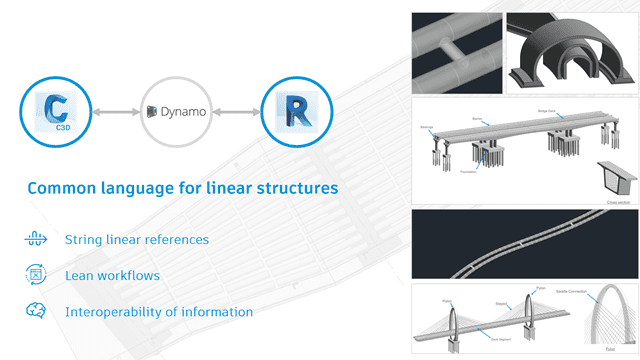
Autodesk Global Consulting Delivery employees – Paolo Serra, Ian McGregor and Mohamed Ahmed – turned a manual and error-prone process for transferring data from Civil 3D to Revit into an efficient and scalable solution that enabled real-time information exchange using Dynamo. Over the course of several years, the solution evolved into a popular product feature and eventually moved to open source.

CivilConnection and CivilPython
“CivilConnection is the name of the Dynamo custom package for Dynamo for Revit that enables the Civil 3D – Dynamo – Revit technology stack for Autodesk Consulting engagements that have been known as “Linear Structures.” It enables the usage of a linear reference system defined in an open Civil 3D document (e.g., a corridor, alignment, feature line, etc.) to create and/or update elements in a Revit document. It also enables you to import and update the elements from a Revit document into a Civil 3D document.”
CivilConnection is a Dynamo for Revit package for Autodesk® Revit and Autodesk® Civil 3D. It enables the exchange of information between Civil 3D, Dynamo and Revit.
CivilPython is a command for Autodesk® Civil 3D that enables the execution of Python scripts accessing AutoCAD and Civil 3D .NET APIs.
If you have questions, post to the Dynamo forums (https://forum.dynamobim.com/) where you can learn more of the capabilities or the right way of using the tools, and find examples and discussion to get going with CivilConnection.
Also in the spirit of opensource and community, post your improvements and bugs use the dedicated page on GitHub. https://github.com/Autodesk/civilconnection
Resources:
Open Source repository https://github.com/Autodesk/civilconnection
Computational Design for Civil Engineers
https://architosh.com/2019/04/new-autodesk-civil-3d-gets-powered-by-new-dynamo-integration/
Autodesk University 2017 Class
Design Automation by Parametric Design of a Viaduct with Dynamo and Revit in 20 minutes
See how design automation can reduce modelling time and increase alternative study so your clients maybe offered to chose from more options and save you. Paolo Serra and Michel Beliën
Checkout Paolo Serra’s AU 2020 class!
Computational Design for Civil Engineers
Learn how to use Dynamo and Civil 3D to create automated workflows for rail, roads, and site development. Paolo Serra, Safi Hage

Layer State Converter runs in 2004? CONVERTLS and CONVERTLMAN don’t works for me
Ignacio,
Are you sure you understand what these two migration tools you mentioned actually do? They are very specific. CONVERTLMAN is used only to convert a saved LMAN Express Tool layer state to a new AutoCAD 2004 layer state. CONVERTLS is only used to convert a saved 2004 layer state in the drawing to a LMAN layer state.
Without more details, it is difficult to determine the possible situation.
Sincerely,
-Shaan
Layer State Converter runs in 2004? CONVERTLS and CONVERTLMAN don’t works for me
Ignacio,
Are you sure you understand what these two migration tools you mentioned actually do? They are very specific. CONVERTLMAN is used only to convert a saved LMAN Express Tool layer state to a new AutoCAD 2004 layer state. CONVERTLS is only used to convert a saved 2004 layer state in the drawing to a LMAN layer state.
Without more details, it is difficult to determine the possible situation.
Sincerely,
-Shaan
Yes Shaan I know the utility of these commands cause I have used them in previous releases of AutoCAD, but in 2004 CONVERTLMAN and CONVERTLS returns “Unknow command” at command line (of course Migration Tools 2004 are installed)
Ignacio,
It soulds like you may not have a complete install or perhaps a configuration setting issue. The LISP files required CONVERTLS.lsp and CONVERTLMAN.lsp should be in your main AutoCAD directory and in the support file path in options or they will not work. Try APPLOADing them.
Cheers,
-Shaan
Yes Shaan I know the utility of these commands cause I have used them in previous releases of AutoCAD, but in 2004 CONVERTLMAN and CONVERTLS returns “Unknow command” at command line (of course Migration Tools 2004 are installed)
Ignacio,
It soulds like you may not have a complete install or perhaps a configuration setting issue. The LISP files required CONVERTLS.lsp and CONVERTLMAN.lsp should be in your main AutoCAD directory and in the support file path in options or they will not work. Try APPLOADing them.
Cheers,
-Shaan
Shaan, thanks for your time
Migration Tools 2004 downloaded again from Autodesk web site, uninstalled and reinstalled again; no “convert*.lsp” in my hard disk
Ignacio,
This may sound funny but did you install both parts of the Migration Assistance? There are two parts to download and install as one is the Batch Drawing Convertor and the other is the tools including the two LISP.
Cheers,
-Shaan
Hi Shaan, yes, both parts installed. Batch Drawing Converter, and in the other hand SciptPro, Commands Alias Porter, etc…, running nice.
(Sorry to use that nice Blogs as a Support Group)
I am not sure of your environment but they definitly install and run in AutoCAD 2004. I would encourage you to post in the Autodesk discussion groups for support at discussion.autodesk.com in the 2004 discussion group.
-Shaan
Shaan, thanks for your time
Migration Tools 2004 downloaded again from Autodesk web site, uninstalled and reinstalled again; no “convert*.lsp” in my hard disk
Ignacio,
This may sound funny but did you install both parts of the Migration Assistance? There are two parts to download and install as one is the Batch Drawing Convertor and the other is the tools including the two LISP.
Cheers,
-Shaan
Hi Shaan, yes, both parts installed. Batch Drawing Converter, and in the other hand SciptPro, Commands Alias Porter, etc…, running nice.
(Sorry to use that nice Blogs as a Support Group)
I am not sure of your environment but they definitly install and run in AutoCAD 2004. I would encourage you to post in the Autodesk discussion groups for support at discussion.autodesk.com in the 2004 discussion group.
-Shaan