Civil 3D corridors scare a lot of people. Not because they are complex, but because the language around them is. Assemblies. Subassemblies. Baselines. Regions. Targets. Frequencies. It adds up fast.
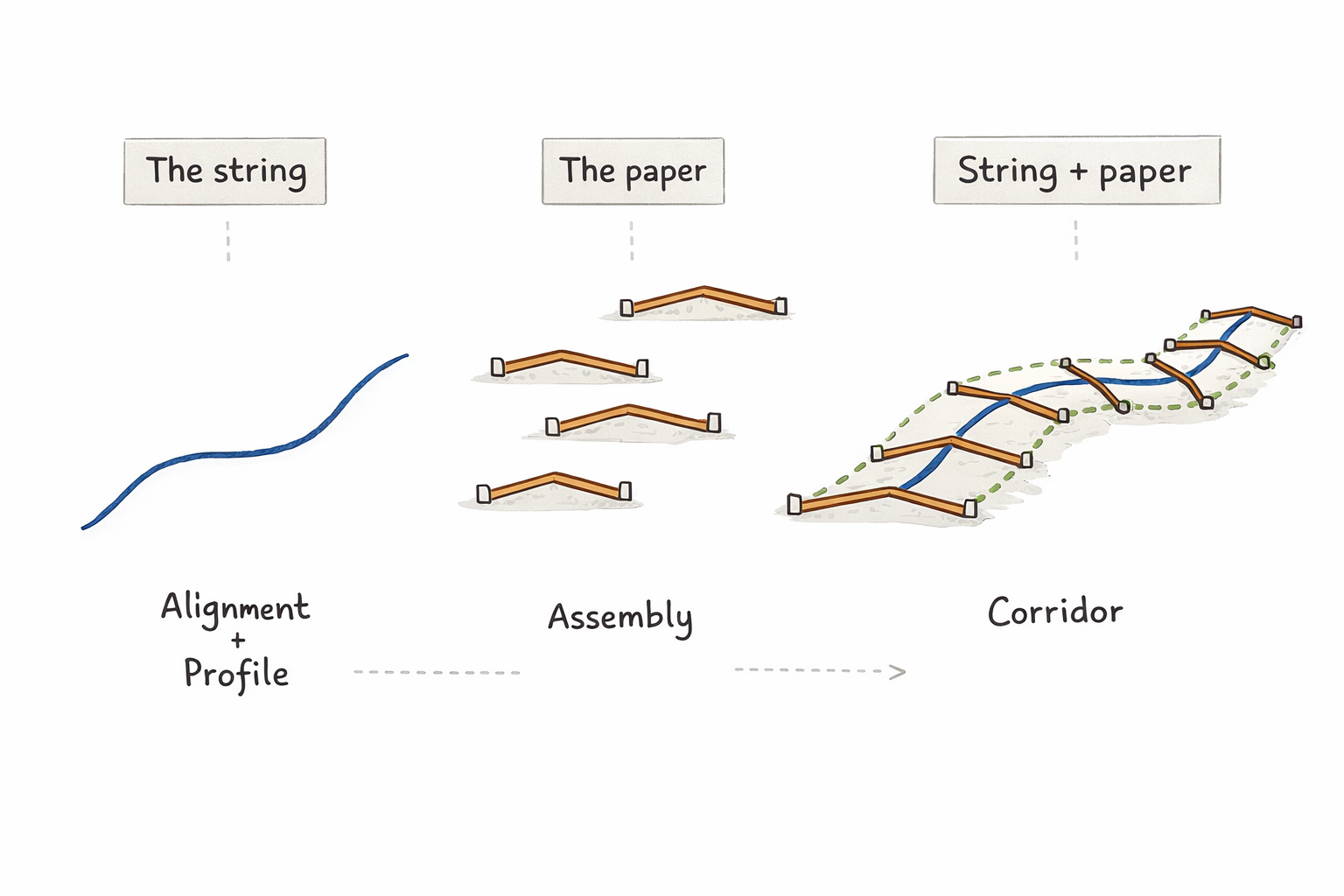
There is a simpler way to think about corridors. Picture a piece of string and a piece of paper. Cameron Smith’s elegant explanation on LinkedIn strips away the complexity and reveals the fundamental truth: a corridor is simply a repeated cross-section placed along a path.
That mental model clears up most corridor questions before you even open the dialog box.
The string: Your alignment and profile
Start with a string floating in space. That string is your alignment and profile combined.
- The alignment defines where the string goes left and right.
- The profile defines where it goes up and down.
- Together they define the exact 3D path of your design.
Nothing in a corridor exists without this string. Every shape, surface, and volume follows it.
The paper: Your assembly
Now take a piece of paper and draw one cross section on it. That drawing is your assembly.
It might show lanes and slopes. Shoulders or curb and gutter. Sidewalks. Daylight links down to existing ground.
That paper is parametric. It can stretch. It can rotate. It can respond to targets. But at its core, it is just one cross section.
The corridor: String plus paper
A corridor is nothing more than placing that paper along the string.
Picture folding the paper several times and cutting through the stack. You end up with identical cross sections.
Place those sections along the string at set intervals. Each one stays perpendicular to the string at that station.
That is the corridor. No mystery. Just repeated cross sections following a path.
How this maps to Civil 3D
Once you see corridors this way, most settings make sense.
Frequency
Frequency answers one question: How far apart should the paper cutouts be placed?
- Tight spacing gives smoother surfaces but takes more processing time.
- Wide spacing runs faster but can introduce surface artifacts.
- Civil 3D also inserts sections automatically where the string curves or changes vertically.
Regions
A region is a stretch of string where you swap out the paper.
Same alignment. Same profile. Different assembly for that portion.
Two lanes transitioning to four lanes is just a new paper template applied over part of the string.
Targets
Targets let the paper respond to its surroundings.
- Surface targets let daylight links stretch to meet ground.
- Alignment targets let parts of the paper follow other paths.
- Profile targets let vertical elements match other profiles.
The string does not change. The paper adapts.
Feature lines
Pick a point on the paper. Edge of pavement. Back of curb. Toe of slope.
Place the paper along the string and that point lines up from section to section.
Connect those points and you get feature lines. They are simply the path traced by a single point on the repeated cross section.
Subassemblies
The paper itself is built from smaller pieces.
Each lane, curb, shoulder, or slope is a subassembly. Some stay fixed. Others flex based on rules and targets.
Together they define how the paper behaves when it meets real conditions.
Using the model in practice
Building a corridor becomes straightforward:
- Create the string with an alignment and profile.
- Build or select the paper by choosing an assembly.
- Assign the assembly to the alignment.
- Set how often the paper gets placed.
- Add regions or targets where behavior needs to change.
When something breaks, go back to the model:
- If the corridor does not follow the path, check the string.
- If the cross section looks wrong, check the paper.
- If surfaces look jagged, check spacing.
- If daylight fails, check targets and subassembly logic.
Complex cases still fit
Intersections are multiple strings meeting with different paper templates. Superelevation is the paper rotating as it follows the string. Variable widths are logic built into the paper while the string stays fixed.
Even advanced corridor features build on the same idea.
Keep the picture in your head
Corridors are powerful, but they are not abstract. Every setting relates back to either the string or the paper.
When Civil 3D asks for an input, ask yourself which one it is touching.
And when the corridor feels overwhelming, stop for a moment and picture that string in space with paper sections placed along it.
