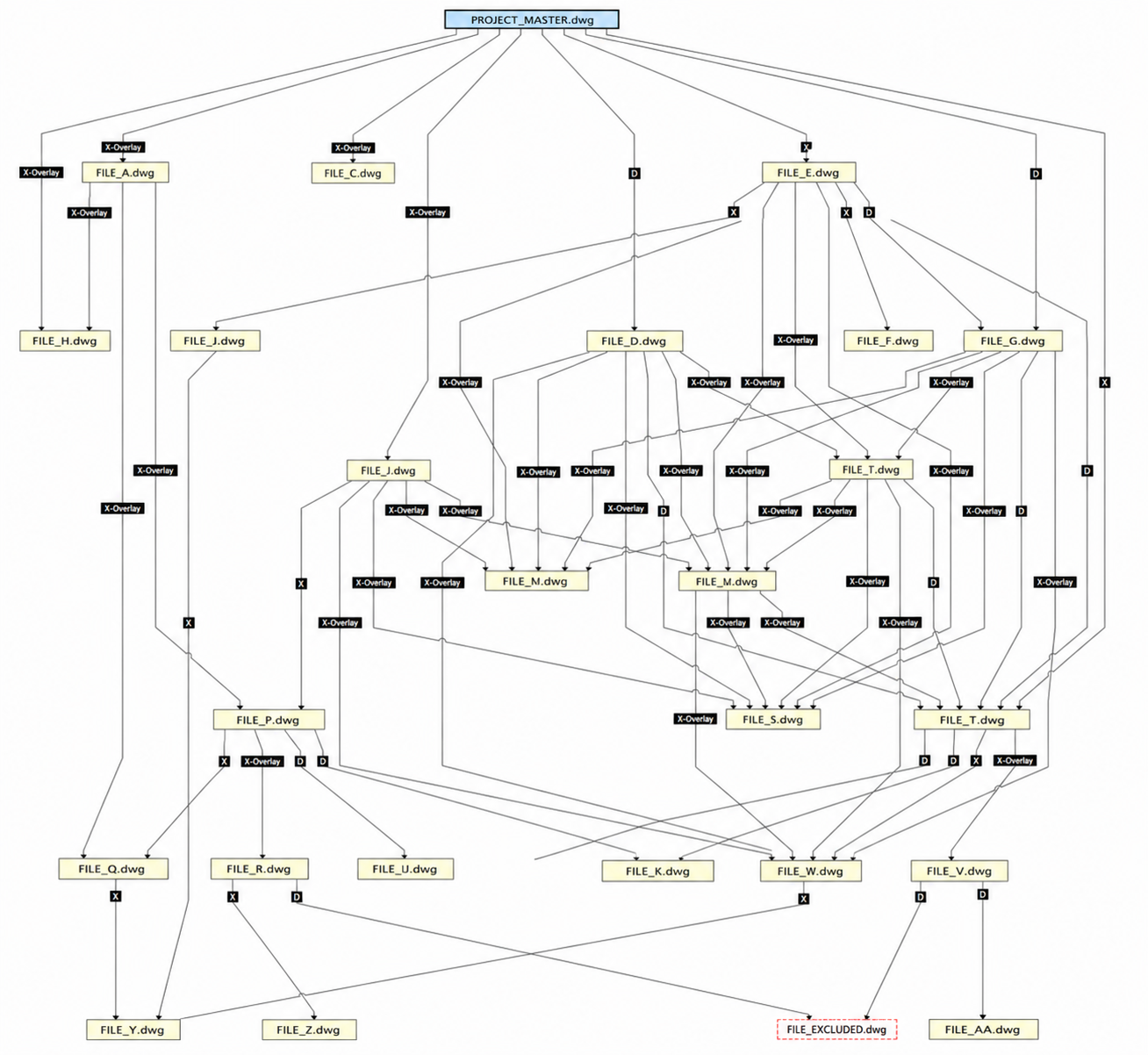
Civil 3D projects rarely fall apart all at once. They erode or degrade over time. A survey surface gets referenced into a corridor drawing. The corridor drawing gets referenced into a sheet set. The sheet set gets pulled back into a model someone forgot was upstream. Three weeks later nobody can open the storm drawing without waiting 90 seconds and quietly hoping it comes back.
I keep calling the whole thing a data pinball machine. Drop a reference into the wrong spot and watch it ricochet through four other files before it breaks something you weren’t even thinking about. Two specific patterns cause most of the damage: cascading references and loops. They’re not the same problem and they don’t fail the same way, so it’s worth pulling them apart.
And no, worrying about this is not paranoia. Autodesk and several DOT standards groups have been writing it down for years. The short version: data should flow in one direction, and references shouldn’t chase their own tail.
Issue 01 / Cascading references, the slow bleed
A cascade is depth. Drawing C consumes a Data Reference from B, which consumes from A. Open C and Civil 3D has to resolve the whole chain back to A before it can show you anything current. Every level you add is another file the software has to find, open in the background, and reconcile on open, on synchronize, and on rebuild.
The cost compounds. One level is cheap. Two is fine. By the time a feature line or surface is sitting four deep, you are paying that resolution tax on every single open across every consumer downstream of it. The WisDOT Civil 3D standards put it plainly: data needs to flow in one direction, and the files that get consumed by many downstream drawings should carry as few connections as possible to avoid longer load times [1].
External references have an escape hatch that data shortcuts do not. With an XREF you can choose Overlay instead of Attach, and Overlay stops the reference from passing through to the next file that references yours. Autodesk’s own guidance is to default to Overlay precisely to stop nesting and circular referencing [2]. DREFs have no equivalent toggle. A Data Reference rides the chain regardless. That’s the part people miss: you can discipline XREF depth with a setting, but DREF depth you have to discipline with project structure.
This is the failure mode that doesn’t announce itself. Nothing crashes. The drawing just gets slower, the corridor rebuild creeps from seconds to a minute, and everyone assumes that is normal for a big project. It’s not normal. It’s depth.
Issue 02 / Loops, the hard crash
A loop is a closed circuit. A references B, B references A, directly or through a couple of files in between. Now there’s no upstream and no downstream, just a ring, and the software has to decide where to start resolving with no good answer. Cascades cost you time. Loops cost you the file.
Here’s the nuance most people get wrong, and it matters: XREFs and DREFs behave differently when they go circular.
AutoCAD handles a circular XREF for you. If it hits a cycle like A references B references C references A while loading, it throws a message and breaks the circular reference for that session so the drawing can still open [3]. The engine has a guardrail. It’s not pretty, but it doesn’t take you down.
Data shortcuts have no comparable guardrail at the create-reference step. A circular DREF arrangement gives you nondeterministic resolution order, failed or partial synchronizes, and crash-on-open or crash-on-rebuild. WisDOT’s standards note the same root cause: XREFs and DREFs only create circular-reference problems when the reference is saved into the host file database, so the host then goes looking for a file that points back at it [1].
Cascades cost you time. Loops cost you the file. And the engine only catches one of the two for you.
And the loop doesn’t have to be pure DREF to bite you. It can close through a mix: an XREF overlay on one edge, a Data Reference on another. People assume Overlay protects them here, because Overlay stops an XREF from passing through to the next file. It does, for the XREF. But a DREF rides the chain regardless of Overlay or Attach, so the data shortcut quietly completes the circuit the overlay setting made you think was open. Now you have a cycle that’s part XREF, part DREF, and AutoCAD’s circular-XREF guardrail doesn’t catch it, because it isn’t looking at the data shortcut side.
The crossover vector: XREF and DREF on the same file
There is a third trap that sits between the two issues, and it’s the one I see bite real projects. Reference the same source drawing both ways, as an XREF and as a data shortcut, and you create a known instability. WisDOT’s XREF best-practice guidance is direct about it: a drawing that contains data shortcut objects shouldn’t be used as an XREF, and if you truly can’t avoid it, freeze the layers of those data shortcut objects so they do not double up [4]. Mixing the two reference types on one file is a crash vector, not a style preference.
So is the concern unreasonable?
It’s not. It’s one of the most documented data-management rules in Civil 3D, repeated by Autodesk’s own learning material, by multiple DOT standards groups, and by every production CAD manager who has watched a sheet file take two minutes to open. The fix is cheap and the failure is expensive, which is exactly the kind of problem worth being slightly fussy about.
What would be unreasonable is treating every reference as suspect. References are the entire point of a managed dynamic model. One owner, many consumers, data flowing downhill. The goal isn’t fewer references. It’s references that go one direction and don’t stack too deep.
How to keep both from happening
- Make data flow one direction. Publishers at the top, consumers at the bottom, sheets at the very end. The sheets drawing consumes everything and owns nothing. If data is flowing back uphill, you are building a loop.
- Default XREFs to Overlay, not Attach. Overlay stops the reference from nesting into the next file down. Attach is how a two-hop chain quietly becomes a five-hop one [2].
- Cap DREF depth at two levels. No setting enforces this, so it is a project-structure decision. If a consumer needs data three owners away, pull it from the right owner directly instead of chaining through an intermediary.
- Never XREF a drawing that owns data shortcut objects. If it is unavoidable, freeze the data shortcut object layers in the host [4].
- Keep permanent XREFs out of heavily consumed files. The files that feed many downstream drawings should carry the fewest connections of anything in the project [1].
- Unload XREFs you are not actively using. You keep the definition and drop the load weight on open. Unloaded is not the same as detached, and it is the right setting for references you need occasionally.
- Repair paths the moment an owner moves. Use Data Shortcuts Repair or the Data Shortcut Editor and do it once, immediately, not over three weeks. A moved owner breaks every consumer pointing at it.
- Synchronize on a ritual, not a whim. Owner edits, owner saves, consumers synchronize, consumers QA the downstream geometry. Skipped synchronize is the number one reason a corridor stops matching its alignment, and people misread it as a bug.
Quick audit
Open the project and ask one question of every drawing: does anything I publish come back to me through any path? If yes, that’s a loop, break it. Then ask: how many owners deep is my deepest reference? If the answer is more than two, flatten it.
What Civil 3D should build to kill these vectors
Right now we prevent both problems with discipline and folder structure. That works, but it asks the user to hold the entire reference graph in their head while giving them almost no way to actually see it. You can’t manage what you can’t see, and Civil 3D keeps the project file architecture behind the curtain. Without a tool like Autodesk Desktop Connector’s Reference Explorer, or a reference-walking tool you wrote yourself, you’re guessing at how the files really connect. I have had to build my own walker to read file health and surface warnings, because the picture I needed wasn’t one the software would show me. The engine already knows the graph. It should hand it over.
A few things I would build if I had the keys:
- Point Autodesk Assistant at the reference graph. An agentic AI is good at exactly this kind of work: walk the dependencies, spot the cascades and loops, and either resolve them or suggest the fix in plain language. Autodesk Assistant could read the project structure the same way it reads anything else, tell me “Drawing C references back to A through the corridor file” before it crashes, and recommend which reference to cut. Let it do the graph-holding the user is doing by hand today.
- Circular DREF detection at create-reference time. AutoCAD already detects and breaks circular XREFs [3]. Do the same for data shortcuts. If creating a reference would close a loop, warn before the link is written, not after the crash.
- A live dependency graph for the whole project. Reference Explorer is a per-drawing start. What is missing is a project-wide view of the full XREF and DREF web that flags cycles and shows depth at a glance. Let me see the pinball machine before the ball drops.
- A depth governor with a soft warning. Let a CAD manager set a max DREF depth per project and have Civil 3D flag references that exceed it, the same way design checks flag a grade that is too steep.
- Block or warn on same-file XREF plus DREF. The crossover crash is well known. The software could detect that a source is already referenced the other way and stop you, or at least ask [4].
- Lazy or background chain resolution. Deep chains tax every open because resolution is eager. Resolve on demand and a fourth-level reference stops punishing the whole team on file open.
- Health telemetry for CAD managers. Surface reference depth, cycle warnings, and broken paths as project health data a manager can see across the fleet, not something you discover one crash at a time.
None of this asks for new theory. The engine already breaks circular XREFs and already tracks every dependency. Extending that same care to data shortcuts and surfacing it to the people managing the project would retire most of this article.
FAQ
What is the difference between a cascading reference and a loop?
A cascade is depth in one direction: A feeds B feeds C feeds D. It costs performance because the whole chain resolves on open. A loop is a closed circuit: the chain eventually points back at itself. It costs stability because there is no valid place to start resolving, which produces failed syncs and crashes.
How deep can a DREF chain be before it becomes a problem?
Two levels is the practical ceiling. One owner, one consumer, done. Past two, every downstream open pays a full chain-resolution cost, and the lag compounds across the project. No Civil 3D setting enforces this, so it’s a structure decision you make up front.
Are circular XREFs as dangerous as circular DREFs?
No. AutoCAD detects a circular XREF on load, shows a message, and breaks the loop for that session so the drawing still opens. A circular data shortcut has no equivalent catch and tends to surface as a crash. The topology looks identical but only one of them has a guardrail.
Can I XREF a drawing that contains data shortcut objects?
Avoid it. A drawing that owns data shortcut objects shouldn’t be used as an XREF. If you genuinely can’t avoid it, freeze the layers of the data shortcut objects in the host so you are not referencing the same data two ways. Mixing both reference types on one source is a known crash vector.
Does unloading an XREF remove its overhead?
It removes the load weight on open while keeping the reference definition, so the file is lighter to open. It is the right setting for references you need only occasionally. Detaching removes the definition entirely; unloading keeps it ready to reload.
How do I find circular references in a Civil 3D project?
For XREFs, AutoCAD tells you on load when it breaks a cycle. For the broader picture, use Reference Explorer per drawing and the Data Shortcut Editor for project-wide DREF paths. The reliable manual check is the one-direction test: if anything a drawing publishes returns to it through any path, that path is the loop.
Civil 3D is powerful. Powerful tools need equally powerful guardrails, or we walk our own data into performance and stability problems that cost real time and real money. The abilities are already here. The protections need to catch up.
One thank-you before I go. The Wisconsin DOT Civil 3D and CAD standards are some of the best public reference material out there, voluminous and actually quite useful, and a good chunk of what is documented in this post traces straight back to their work. If you manage Civil 3D and have not read through it, do: Wisconsin DOT CAD and Civil 3D Knowledge Base.
Cheers,
Shaan
Sources
- Data management for Civil 3D projects, WisDOT Civil 3D Knowledge Base.
- Data Management Practices in Civil 3D, Autodesk Learn.
- Resolve Circular External References, Autodesk AutoCAD documentation.
- External reference best practices, WisDOT Civil 3D Knowledge Base.