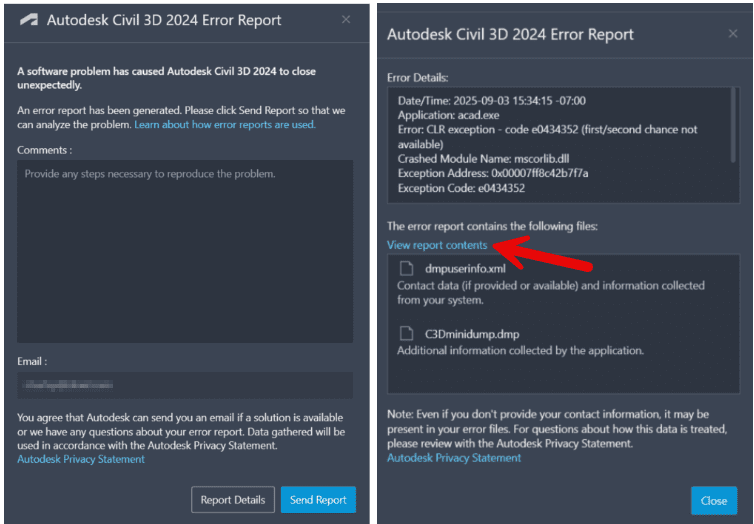
If you manage CAD or BIM environments, you know how valuable data can be when things start crashing. Autodesk’s Customer Error Reports (CER) quietly hold a lot of that data—but most CAD Managers never see them. They’re automatically sent to Autodesk after a crash since 2025 products, and were manually sent via a dialog prior, but the same reports could be just as useful locally for diagnosing issues and improving reliability.
Updated 12/29/2025
Created a technical reference on what I know based on analyzing Autodesk CER userinfo.,xml files. Can be helpful in analyzing your CER files using data tools like PowerShell, Power BI etc. Autodesk Customer Error Reporting (CER) UserInfo.xml Format Specification

Every Autodesk product writes a local copy of the CER files here:C:\Users\YourUserName\AppData\Local\Autodesk\CER
Inside that folder, you’ll find XML and DMP files created after each crash. These contain detailed system and product information—exactly the kind of data that can help CAD Managers get ahead of recurring issues before they impact productivity.
When I’m troubleshooting Autodesk Civil 3D or AutoCAD crashes, I often review these files from the user’s machine. They are xml and you can open up in a browser or even products like ChatGPT or other AI tools to digest and help diagnose issues.

These CERs can tell you a lot:
- Product build and version (was everyone on the same release?)
- Installed add-ons and third-party apps that may be conflicting
- Windows build, GPU driver versions, and hardware specs
- Recent activity before the crash—commands, tools, or file paths
- Whether a corrupt font, DWG, or Revit file was involved and what the file name was
- If a specific project location, template, or network path triggered it
- Changes in frequency or patterns tied to updates or hardware rollouts
Updated 12/29/2025
Created a technical reference on what I know based on analyzing Autodesk CER userinfo.,xml files. Can be helpful in analyzing your CER files using data tools like PowerShell, Power BI etc. Autodesk Customer Error Reporting (CER) UserInfo.xml Format Specification
Over time, this data reveals patterns. Maybe one office has a spike in crashes after a driver update. Maybe a single plug-in is showing up in every DMP file. Without CER visibility, it’s all guesswork.
As IT/IS or CAD Managers, we’re responsible for the health of our design environments. Autodesk gives Autodesk administrators for customer subscriptions access to support tickets through the Autodesk manage Portal, but imagine if we could view aggregated CER data the same way for all our users. It would help IT and CAD leaders track stability trends across users and products—spotting problems early instead of waiting for complaints.
Fingers Crossed: An Autodesk employee has mentioned that CER reporting may be available to Autodesk administrators in the future. Once enabled, administrators will be able to view crash data across the company, identify similar incidents, spot trends, and research what may have changed in our environment. This visibility will also help us escalate recurring issues with Autodesk more effectively.
CER data shouldn’t live in a black box. It’s our frontline diagnostic tool for understanding why users crash, how often, and where fixes will have the biggest impact. Giving CAD Managers visibility into that data would make Autodesk environments stronger, faster, and far less frustrating for everyone.
More Info:
Crashes, Clues, and Two Big Wins From Autodesk CER Files

I didn’t know this and now I’m going to build a script to grab and hopefully parse that data or at least notify my techs that the data is out there to be reviewed. I manage the IT team and have ~400 Autodesk users. I have seen CER has been getting updated recently but never knew how important it was or what it did.
Exactly, CER is a CAD Manager / IT Team resource to give you clues about a crash as well as the environment. I’m looking at writing a web page to process and digest CER files. Maybe a script to grab all CER files regularly from hundreds of users.
[…] we dig into the CER (xml file) and debug logs, we find the same root cause. Old keys. Old folders. Old things. Things the uninstall […]